
Automating LinkedIn Recruiter When There Is No API
Sep 3, 2026 · Updated Sep 4, 2026
LinkedIn Recruiter has no public API and punishes seat sharing, so the usual integration approach fails. How we ran overnight candidate sourcing for a recruitment agency by giving an agent a desktop and a browser.
In short. There is no LinkedIn Recruiter API, and a Recruiter seat cannot be used from two places at once. So we gave an agent its own Linux desktop with a real browser, handed it the consultant's seat at 18:00, and let it source, screen and draft until 08:00. Candidates land in a Recruiter project and in Bullhorn. A human reads and sends every message. The agency's first feedback was that it made them busier, because the bottleneck moved from sourcing to conversations.
A recruitment agency in London asked us for something their CRM vendor could not sell them. They wanted their candidate sourcing to continue after their consultants went home.
The obvious version of this is an integration. Their CRM is Bullhorn, which has a documented REST API, so writing candidates and notes into it is ordinary software work. The problem is that Bullhorn is where sourcing ends, not where it happens. Sourcing happens in LinkedIn Recruiter, and LinkedIn Recruiter has no public API.
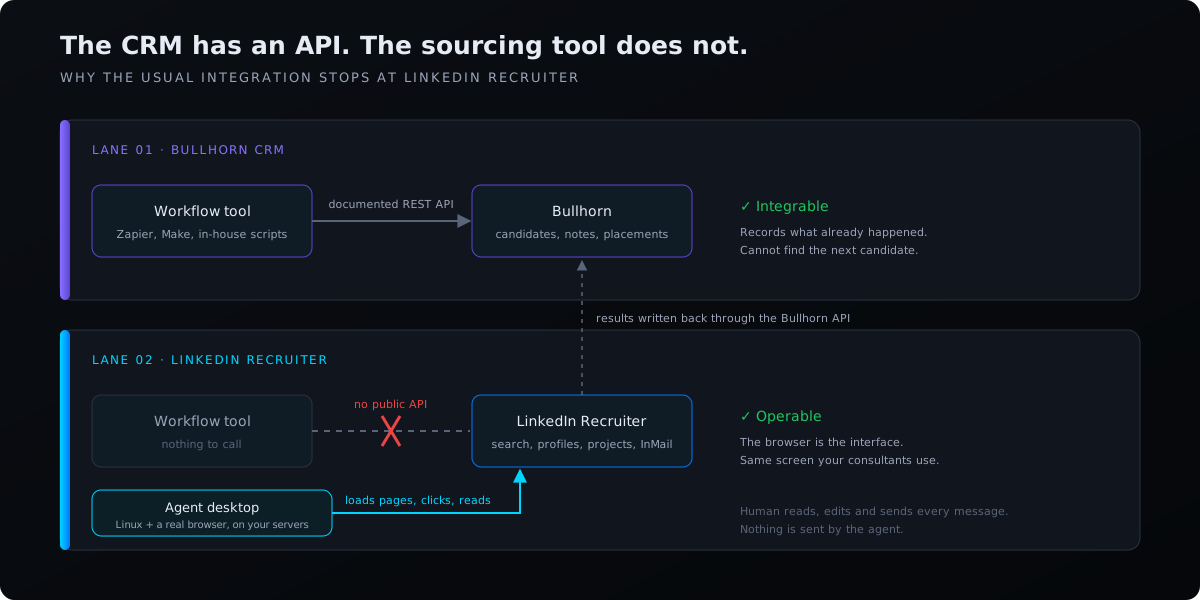
That is not an oversight to be worked around with a support ticket. There is no partner programme that opens up Recruiter search to a third party the way the Bullhorn API opens up a CRM record. If you want a machine to run a Recruiter search, the machine has to use Recruiter, in a browser, the way a person does.
Two constraints that shape the whole design
- Constraint 01No API means the browser is the interfaceAnything the system does in Recruiter, it does by loading pages and clicking. There is no shortcut layer underneath, and no LinkedIn Recruiter automation tool can create one.
- Constraint 02A seat does not like being used twice at onceSeats are licensed per named user. Simultaneous sessions from two places get treated as account sharing, which consultants already notice when they log in from a second device.
So an agent working the account while its owner is also working it is not a performance problem to tune. It is a design constraint that rules out the concurrent model entirely.
Those two together explain why this had not been solved with the tools the agency already owned. Their workflow automation platform could not reach into Recruiter, and anything that could reach into Recruiter would collide with the consultant using it.
Giving the agent a computer
Helix runs each agent on its own Linux desktop, a container with a real graphical environment and a real browser. We built this for coding agents, so that an agent could run an IDE and a test suite and see what it was doing. The recruitment work uses the same thing for a different reason: a desktop is a general-purpose interface to software that has no other interface.
The desktop is shared. A person connects to it through their browser and sees what the agent sees, with the mouse and keyboard available. That turned out to matter more than the automation. Setting up a search is not a task you can specify well in a prompt, because the criteria that make a candidate right for a brief are mostly tacit. A consultant sitting on the same desktop, running the search themselves once while talking through what they are looking at, transfers more than an hour of written instructions would.
The night shift
The seat constraint has one clean answer, which is to take turns.
- Consultant
- Agent desktop
At the end of the day the consultant hands their Recruiter session over to the agent desktop. The agent then has the account to itself for the hours nobody is using it.
- 1Work the live searchesThe agent opens the saved searches for each open brief and pages through results the way the consultant showed it to.
- 2Open and screen profilesEach profile is read against the brief. Ones that fit are added to the Recruiter project for that role, with a short note on why.
- 3Draft outreach in the consultant's voiceA first-draft message sits against each candidate, written in the register of the messages the consultant wrote by hand.
- 4Write structured records to BullhornCandidate records and notes go into the CRM through its API. Bullhorn stays the system of record.
- 5Post a batch summary to SlackOne message when a batch lands, so the team knows what is waiting before they open Recruiter.
The output is not a report. It goes back into the tools the team already opens first thing. In the morning the consultant opens Recruiter and finds a project that was empty when they left.
Nothing is sent. Every draft waits for a human to read it, change it, and press send.
The feedback we did not expect
The first thing the agency told us after a week was that it was keeping them busier.
We had been prepared to defend a time-saved number. What actually happened was that the bottleneck moved. Sourcing had been the constraint, so the pipeline was shaped by how many profiles two delivery consultants could get through. Once sourcing ran overnight, the constraint became the number of real conversations the team could have the next day, which is the part of the job they are paid for.
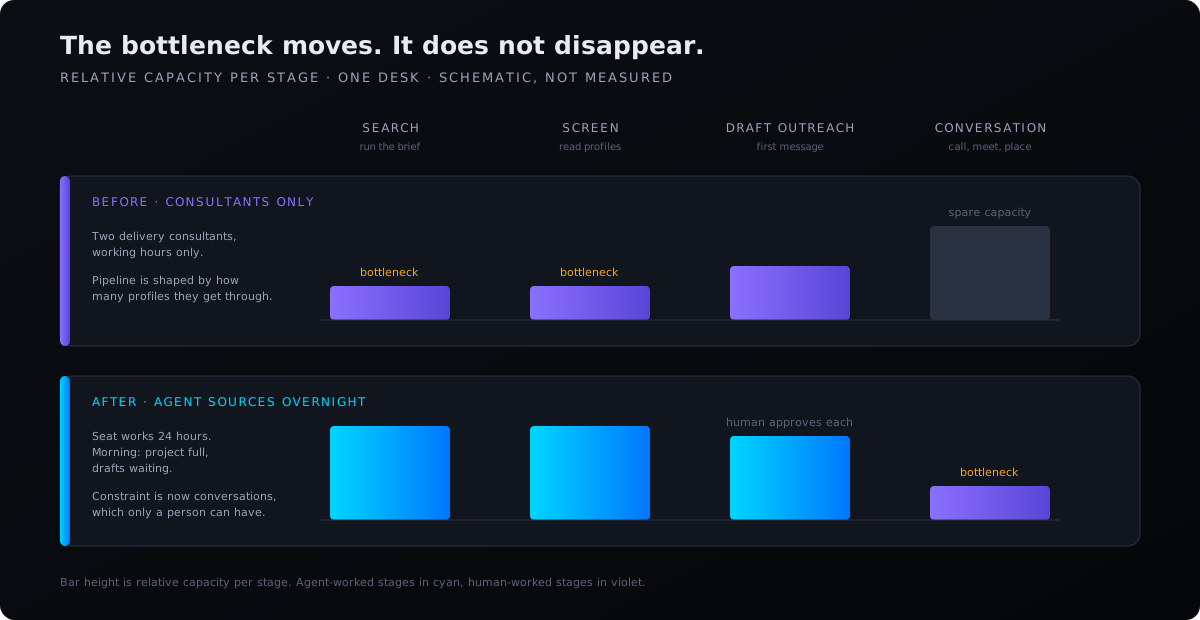
For an agency whose model is high-touch, that is the trade they want. For one running volume outreach with minimal human contact, it is not, and the honest answer there is that a cheaper sequencing tool does that job.
What this costs you
A human is in the loop on every message, so review capacity is the new ceiling. The agent can draft faster than a consultant can approve. Past a certain point you are queueing work for people rather than removing it, and the system stops helping. The recruitment agencies page has a planning model where you can see where that line falls for your desk.
Browser work is slower and more brittle than an API. A REST call either succeeds or returns an error. A page load can succeed and be the wrong page. The agent has to check that it is where it thinks it is, and interfaces change without notice, so this needs maintenance in a way an API integration does not.
Recruiter's terms restrict automated access. LinkedIn's User Agreement prohibits using software, scripts or bots to access the service or extract data from it, and Recruiter sits under a separate commercial contract on top of that. Running an agent on a licensed seat outside working hours is not the same as scraping profiles at scale from an unlicensed account, and it is also not obviously permitted. Read your own Recruiter contract and decide with your legal adviser. We are not going to tell you it is fine.
Candidate data is personal data. Sourcing produces CVs, contact details and notes about identifiable people, and the agency is the controller for all of it under UK GDPR. This is one reason the whole system runs on the agency's own infrastructure with models running locally. It is also why the human approval step is not only a quality control: automated decision-making about people carries obligations under Article 22, and the EU AI Act classifies worker-selection systems as high risk.
Where this generalises
A category of work here was blocked on the absence of an API, and the absence of an API stopped being a blocker once the agent had a screen.
Most companies have at least one system like Recruiter: load-bearing, used all day, and closed. The usual advice is to replace it with something integrable, which is a migration nobody wants to run. Driving it in a browser instead is less elegant and available immediately.
Frequently asked questions
- Is there a LinkedIn Recruiter API?
- No. LinkedIn does not offer a public API for Recruiter search, profiles, projects or InMail, and there is no partner programme that grants one to third parties. The only interface is the Recruiter web application. The Recruiter System Connect integration exists for ATS vendors, but it syncs records; it does not let software run searches.
- How does LinkedIn Recruiter automation work without an API?
- The software has to use Recruiter the way a person does. Helix gives an agent its own Linux desktop with a real browser, running on your infrastructure. The agent logs in to the seat, runs saved searches, opens profiles, adds candidates to projects and drafts messages, all through the normal interface. Results are written to your CRM through its API.
- Why can't the agent and the consultant use the seat at the same time?
- Recruiter seats are licensed per named user and LinkedIn treats simultaneous sessions from two places as account sharing. So the consultant hands the seat to the agent at the end of the day and takes it back in the morning. The agent only works the account when nobody else is.
- Does the agent send messages to candidates?
- No. The agent writes first drafts and leaves them against each candidate in the Recruiter project. A consultant reads, edits and sends every message. This keeps a person on every consequential decision, which is also what UK GDPR Article 22 and the EU AI Act expect for hiring systems.
- Is LinkedIn Recruiter automation allowed under LinkedIn's terms?
- LinkedIn's User Agreement prohibits bots and scripts, and Recruiter has its own commercial contract on top. Running an agent on a licensed seat outside working hours is different from scraping at scale from an unlicensed account, but it is not obviously permitted either. Read your Recruiter contract and take legal advice. We will not tell you it is fine.
- What is candidate sourcing automation?
- Candidate sourcing automation is software that runs searches, screens profiles against a brief and builds a long list without a person doing each step by hand. Most tools stop at the CRM because the sourcing platforms have no API. An agent with a desktop can do the sourcing itself, in LinkedIn Recruiter, and hand the shortlist to a human.